
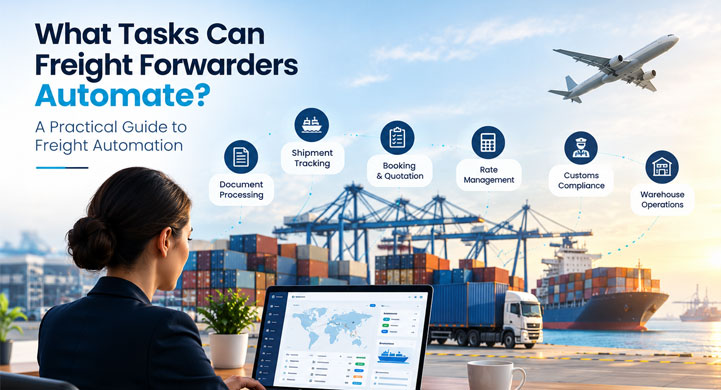
Freight forwarding involves hundreds of repetitive tasks across sales, pricing, operations, documentation, tracking, customer service, warehouse operations and finance.
Many of these tasks can now be automated.
Freight forwarders can automate tasks such as enquiry capture, rate management, quotation preparation, booking creation, document processing, shipment updates, tracking notifications, customer communication, billing and reporting.
The biggest opportunity is not replacing freight professionals.
It is reducing repetitive administrative work so teams can spend more time on customers, exceptions, negotiations and operational decisions.
This guide explains which freight forwarding tasks can be automated, which require AI, which still need human involvement and where companies should start.
What Tasks Can Freight Forwarders Automate?
The most common freight forwarding tasks that can be automated include:
- Customer enquiry capture
- Freight rate collection and management
- Quotation preparation
- Follow-up reminders
- Booking creation
- Shipment data entry
- Freight document processing
- Shipment milestone updates
- Container tracking
- Customer notifications
- Exception alerts
- Warehouse and CFS updates
- Billing workflows
- Payment follow-ups
- Operational reporting
- Data validation
- Internal task assignment
- Repetitive email processing
The right level of automation depends on the task.
Some activities can be fully automated.
Others are better suited to AI assistance with human approval.
1. Customer Enquiry Capture
Freight enquiries often arrive through email, web forms or other communication channels.
An enquiry may contain:
- Origin
- Destination
- Cargo
- Container type
- Quantity
- Incoterms
- Customer name
- Required shipment date
Instead of manually reading and entering every field, automation can capture the information and create a structured enquiry.
Manual
Email → Read → Copy → Paste → Enter
Automated
Email → Extract → Validate → Create enquiry
What can be automated?
- Email reading
- Customer identification
- Shipment detail extraction
- Enquiry creation
- Missing-information alerts
- Task assignment
Where is human input needed?
When the enquiry is incomplete, ambiguous or commercially complex.
2. Freight Rate Management
Pricing teams often work with rates from multiple sources:
- Shipping lines
- Airlines
- Co-loaders
- Agents
- Rate sheets
- PDFs
- Spreadsheets
- Customer-specific agreements
Automation can reduce the manual effort involved in organizing and retrieving rate information.
Tasks that can be automated
- Rate data entry
- Rate validity checks
- Rate matching
- Charge calculations
- Surcharge application
- Rate expiry alerts
- Customer-specific pricing rules
The goal is to help pricing teams find the relevant information faster rather than searching through multiple sources every time.
3. Freight Quotation Preparation
Once the rate is available, creating the quotation is another area with repetitive work.
A quotation may require:
- Customer details
- Origin
- Destination
- Cargo details
- Freight rate
- Local charges
- Surcharges
- Taxes
- Validity
- Terms and conditions
If this information already exists in the enquiry and pricing workflow, it should not need to be entered again.
Automation can help generate quotations using existing information.
Workflow
Enquiry → Pricing → Quote → Customer
This reduces duplicate data entry and can improve quote turnaround time.
For forwarders looking to connect these processes, a freight forwarding automation software platform can bring enquiry, pricing and downstream shipment workflows into a connected process.
4. Sales Follow-Ups
Following up with customers is essential, but manually remembering every follow-up can become difficult as enquiry volumes increase.
Automation can help with:
- Follow-up reminders
- Quote expiry reminders
- Customer notifications
- Lead status updates
- Task assignment
- Follow-up scheduling
For example:
Quote sent → No response → Follow-up task created
The salesperson still manages the customer relationship.
The system simply makes sure important follow-ups are not forgotten.
5. Booking Creation
After a customer accepts a quotation, the shipment moves toward booking.
Without automation, employees may re-enter information that already exists in the quotation.
Automation can carry relevant information forward.
Instead of:
Quote → Re-enter information → Create booking
Use:
Quote approved → Booking created → Shipment workflow started
Tasks that can be automated include:
- Shipment record creation
- Customer information transfer
- Cargo information transfer
- Container information transfer
- Booking status updates
- Internal task assignment
This reduces unnecessary data entry.
6. Shipment Data Entry
A shipment can contain a large amount of information.
Examples include:
- Shipper
- Consignee
- Notify party
- Origin
- Destination
- Vessel
- Voyage
- Container
- Cargo
- Weight
- Volume
- Documents
- Charges
Entering the same information into multiple systems creates additional work and increases the possibility of errors.
A connected workflow allows information captured earlier to be reused throughout the shipment lifecycle.
This is one of the most important principles of freight automation:
Capture information once. Reuse it wherever possible.
7. Freight Document Processing
Documentation is one of the strongest areas for AI-powered automation.
Freight forwarders process documents such as:
- Bill of Lading
- Commercial Invoice
- Packing List
- Booking Confirmation
- Shipping Bill
- Arrival Notice
- Delivery Order
Instead of manually reading every document and entering information, AI document processing can help extract relevant fields.
Automated workflow
Document received
↓
Document classified
↓
Information extracted
↓
Data validated
↓
Shipment updated
↓
Exception flagged if required
↓
Document classified
↓
Information extracted
↓
Data validated
↓
Shipment updated
↓
Exception flagged if required
This can significantly reduce repetitive document-entry work.
8. Bill of Lading Data Extraction
The Bill of Lading contains important shipment information.
Employees may need to verify:
- Shipper
- Consignee
- Notify party
- Port of loading
- Port of discharge
- Vessel
- Voyage
- Container numbers
- Packages
- Weight
- Cargo description
AI can assist with extracting these fields from documents.
Human review can remain in place for critical information.
This creates a practical model:
AI extracts → System validates → Human reviews exceptions
9. Shipment Milestone Updates
Operations teams frequently update shipment statuses.
Examples:
- Booking confirmed
- Cargo received
- Container gated in
- Vessel departed
- Transshipment
- Vessel arrived
- Cargo available
- Delivered
If employees manually update every milestone, the workload increases with shipment volume.
Workflow automation can trigger updates based on available events or status changes.
For example:
Vessel departure detected → Shipment milestone updated
This reduces repetitive operational administration.
10. Container Tracking
Customers and internal teams need shipment visibility.
Instead of manually checking carrier portals or other sources, automated tracking workflows can collect relevant status information and update the shipment record.
Tasks that may be automated include:
- Container status updates
- ETA changes
- Departure notifications
- Arrival notifications
- Delay alerts
- Milestone updates
- Customer notifications
Industry initiatives such as the Digital Container Shipping Association’s standards are also focused on improving standardized digital information exchange across container shipping.
Automation becomes more powerful when systems can exchange consistent information.
11. Customer Shipment Notifications
Customer service teams often spend time answering routine questions:
- Where is my shipment?
- Has the vessel departed?
- When will it arrive?
- Has the container reached the destination?
If the information is already available, automated notifications can reduce repetitive communication.
For example:
Shipment departed → Customer notification triggered
ETA changed → Updated ETA notification
Container arrived → Arrival notification
ETA changed → Updated ETA notification
Container arrived → Arrival notification
Human intervention remains important when the customer needs an explanation or when an exception occurs.
12. Exception Detection
Not every task should be automated by simply following a fixed rule.
Some situations require the system to identify something unusual.
Examples include:
- Missing documents
- Unexpected shipment delays
- ETA changes
- Incorrect shipment information
- Missing charges
- Documentation mismatches
- Unusual operational events
AI can help identify potential exceptions and bring them to an employee’s attention.
Instead of employees checking everything manually:
System monitors → Exception detected → Employee notified
This is often more valuable than automating routine actions alone.
13. Warehouse and CFS Tasks
Forwarders that operate warehouses or CFS facilities have additional automation opportunities.
Tasks can include:
- Cargo receiving
- Cargo identification
- Inventory updates
- Cargo movement
- Storage information
- Release status
- Dispatch
- Operational reporting
Connecting these activities with freight operations can reduce duplicate data entry.
CargoNet’s warehouse management software supports connected warehouse workflows across inbound, storage and outbound activities.
14. Billing and Invoice Preparation
Finance teams often depend on information generated by operations.
Manual processes may involve collecting:
- Shipment details
- Customer information
- Freight charges
- Vendor costs
- Additional charges
- Taxes
- Billing status
Automation can help transfer relevant operational information into billing workflows.
For example:
Shipment completed → Charges available → Billing task triggered
This can reduce the time finance teams spend collecting operational information.
15. Payment Follow-Ups
After invoices are created, payment follow-ups can also involve repetitive administrative work.
Automation can support:
- Payment reminders
- Due-date alerts
- Outstanding invoice reports
- Customer follow-up tasks
- Escalation reminders
- Payment status updates
The finance team still manages customer-specific situations, but routine reminders can be handled automatically.
16. Operational Reporting
Freight managers need visibility into:
- Shipment volumes
- Revenue
- Costs
- Profitability
- Pending bookings
- Delayed shipments
- Documentation status
- Customer activity
- Operational performance
Manually preparing reports can consume significant time.
Connected operational data can make reporting faster and more consistent.
Instead of:
Collect data → Clean data → Prepare spreadsheet → Create report
the workflow can become:
Operational data → Dashboard → Analysis
This allows managers to spend more time interpreting information rather than preparing it.
17. Internal Task Assignment
Freight forwarding involves many handoffs.
For example:
Sales → Pricing → Operations → Documentation → Finance
Automation can assign tasks based on:
- Shipment stage
- Department
- Customer
- Branch
- Exception type
- Due date
- Workflow status
For example:
Booking confirmed → Documentation task assigned
Shipment arrived → Delivery task assigned
Invoice due → Finance follow-up assigned
Shipment arrived → Delivery task assigned
Invoice due → Finance follow-up assigned
This creates a more structured operational workflow.
18. Email Processing
Email remains a major source of freight information.
AI can help process emails containing:
- Rate requests
- Booking confirmations
- Shipment updates
- Documents
- Customer instructions
- Delivery information
Possible automation:
Email received → Understand → Extract → Match → Update → Escalate
This can reduce the amount of manual email processing required by freight teams.
Which Freight Tasks Can Be Fully Automated?
Some tasks are highly structured and can often be automated with limited human involvement.
Examples include:
Task
Automation potential
Follow-up reminders
High
Status notifications
High
Task assignment
High
Data transfer between workflows
High
Rate expiry alerts
High
Standard reporting
High
Routine milestone updates
High
Payment reminders
High
These tasks usually follow predictable rules.
Which Freight Tasks Are Better Suited to AI?
AI becomes more useful when information is unstructured or requires interpretation.
Examples include:
Task
Why AI helps
Email processing
Understands variable formats
Document extraction
Reads different document layouts
Document classification
Identifies document types
Data matching
Compares information across sources
Exception detection
Identifies unusual situations
Shipment summaries
Converts complex information into concise updates
Customer response assistance
Helps interpret and respond to requests
AI does not necessarily mean fully autonomous decision-making.
In many cases, the best model is:
AI assists → Human approves
Which Freight Tasks Should Stay With Humans?
Some activities require experience, judgment or negotiation.
These include:
- Complex customer negotiations
- Strategic pricing decisions
- Major exceptions
- Customer relationship management
- Compliance decisions
- Credit decisions
- Dispute resolution
- Unusual shipment problems
Automation should support these activities rather than blindly replace human decision-making.
A practical model is:
Automate
Repetitive and predictable tasks.
Assist
Tasks requiring information interpretation.
Escalate
Tasks requiring human judgment.
How Do You Decide What to Automate First?
A simple framework is to score each task based on five factors:
1. Volume
How frequently is the task performed?
2. Repetition
Does the same process happen repeatedly?
3. Time
How much employee time does it consume?
4. Error risk
How often does manual processing cause mistakes or rework?
5. Business impact
Does automating the task improve customer experience, revenue, cost or operational efficiency?
The highest-scoring tasks are usually the best automation candidates.
Example: Automating One Freight Shipment
Consider a typical shipment.
Step 1 — Enquiry
Customer sends an RFQ.
Automation: Extract shipment details and create enquiry.
Automation: Extract shipment details and create enquiry.
Step 2 — Pricing
Relevant rate information is identified.
Automation: Match shipment requirements with available rates.
Automation: Match shipment requirements with available rates.
Step 3 — Quotation
Quote is created.
Automation: Reuse enquiry and pricing data.
Automation: Reuse enquiry and pricing data.
Step 4 — Booking
Customer accepts.
Automation: Create booking and shipment workflow.
Automation: Create booking and shipment workflow.
Step 5 — Documentation
Documents arrive.
AI: Extract relevant information.
AI: Extract relevant information.
Step 6 — Operations
Shipment milestones change.
Automation: Update workflow and notify relevant teams.
Automation: Update workflow and notify relevant teams.
Step 7 — Tracking
Shipment status changes.
Automation: Update tracking information.
Automation: Update tracking information.
Step 8 — Delivery
Shipment reaches destination.
Automation: Trigger relevant operational tasks.
Automation: Trigger relevant operational tasks.
Step 9 — Billing
Shipment charges are ready.
Automation: Initiate billing workflow.
Automation: Initiate billing workflow.
This is what end-to-end freight automation looks like.
It is not one automated task.
It is connected automation across the shipment lifecycle.
What Is the Difference Between Freight Automation and AI Automation?
The two terms are related but not identical.
Workflow automation
Best for predictable processes.
Example:
If booking is confirmed → create shipment task.
AI automation
Best for information that requires interpretation.
Example:
Read an incoming email → identify shipment details → extract information → determine what workflow it belongs to.
Combined approach
The strongest workflows often combine both:
AI understands → Automation acts → Human handles exceptions
This allows freight companies to automate processes that were previously difficult to automate because the input was unstructured.
How Can Freight Forwarders Measure Automation Results?
Automation should be measured using operational metrics.
Productivity
- Manual tasks per shipment
- Data-entry time
- Employee processing time
- Number of manual touches
Speed
- Quote turnaround
- Booking processing time
- Document processing time
- Billing turnaround
Accuracy
- Data-entry errors
- Duplicate records
- Missing information
- Rework
Customer experience
- Response time
- Quote response time
- Shipment update response time
- Exception resolution time
The objective is not to maximize the number of automated tasks.
The objective is to remove unnecessary work while improving operational performance.
What Should a Freight Forwarder Automate First?
For most forwarders, a practical starting point is:
1. Enquiry capture
↓
2. Quotation workflow
↓
3. Booking creation
↓
4. Document processing
↓
5. Shipment updates
↓
6. Tracking notifications
↓
7. Billing
↓
2. Quotation workflow
↓
3. Booking creation
↓
4. Document processing
↓
5. Shipment updates
↓
6. Tracking notifications
↓
7. Billing
This sequence follows the natural flow of freight information.
Once the core workflow is connected, more advanced AI and automation can be introduced.
How CargoNet Helps Automate Freight Operations
CargoNet brings freight operations into a connected platform covering areas such as sales, pricing, shipment operations, documentation, tracking, warehouse/CFS operations and finance.
The platform is designed to reduce repetitive work by connecting information across the freight lifecycle and combining workflow automation with AI capabilities.
Forwarders can explore the CargoNet freight forwarding automation software to see how connected workflows can support freight operations.
The goal is not to automate every decision.
It is to automate the repetitive work surrounding those decisions.
Capture information once.
Automate repetitive actions.
Surface exceptions.
Keep people focused on customers and decisions.
Automate repetitive actions.
Surface exceptions.
Keep people focused on customers and decisions.
Conclusion
Freight forwarding contains many tasks that do not require employees to perform the same manual steps repeatedly.
The biggest automation opportunities are usually found in:
Enquiries → Pricing → Quotations → Bookings → Documents → Operations → Tracking → Customer Updates → Billing
The most effective approach is not to automate everything blindly.
Instead:
Automate predictable tasks.
Use AI for unstructured information.
Connect data across workflows.
Escalate exceptions to people.
Measure the operational impact.
Use AI for unstructured information.
Connect data across workflows.
Escalate exceptions to people.
Measure the operational impact.
When these pieces work together, freight forwarders can move from manually managing individual tasks to managing a connected freight workflow.
The future of freight automation isn’t about removing people from freight operations. It’s about removing unnecessary work from the people running them.
Frequently Asked Questions
What tasks can freight forwarders automate?
Freight forwarders can automate enquiry capture, rate management, quotations, bookings, document processing, shipment updates, tracking notifications, customer communication, warehouse workflows, billing, payment reminders and reporting.
What is the easiest freight forwarding task to automate?
Simple, repetitive and rule-based tasks are usually the easiest to automate. Examples include reminders, notifications, task assignments, data transfers, status updates and standard reports.
Can freight forwarders automate quotation preparation?
Yes. Quotation workflows can reuse enquiry and pricing information, automate calculations and reduce repetitive data entry.
Can AI automate freight documents?
Yes. AI-powered document processing can extract information from documents such as Bills of Lading, invoices, packing lists and booking confirmations. Human review can remain in place for exceptions or critical information.
Can shipment tracking be automated?
Yes. Tracking workflows can collect available shipment events, update milestones and trigger notifications when important status changes occur.
Can freight forwarding emails be automated?
AI can help classify incoming emails, extract shipment information, identify documents and route information to the appropriate workflow. Human involvement may still be required for complex requests.
Can finance tasks be automated in freight forwarding?
Yes. Billing workflows, charge collection, invoice preparation, payment reminders, reconciliation support and financial reporting can all have automation opportunities.
Will freight automation replace freight forwarding employees?
Not necessarily. The main purpose of automation is to reduce repetitive administrative work. Human expertise remains important for negotiations, customer relationships, exceptions, compliance and complex decisions.
How should a freight forwarder start automation?
Start by identifying high-volume, repetitive tasks that consume significant employee time or create frequent errors. Automate those processes first, measure the results and then expand automation across the workflow.