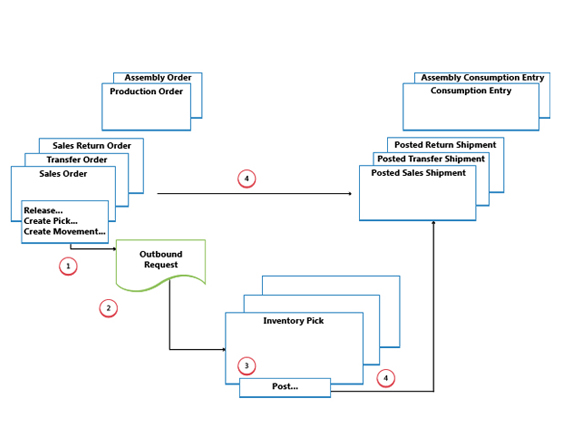
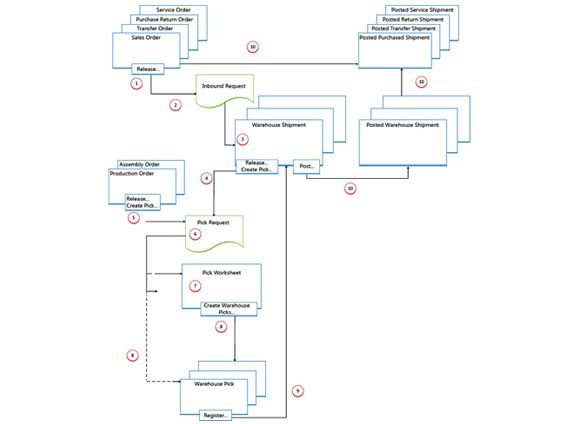
The outbound flow in the warehouse begins with a request from released source documents to bring the items out of the warehouse location, either to be shipped to an external party or to another company location. From the storage area, warehouse activities are performed at different complexity levels to bring the items out to the shipping docks.
Each item is identified and matched to a corresponding inbound source document.
The following outbound source documents exist
Sales order
Outbound transfer order
Purchase return order
Service order
In addition, the following internal source documents exist that function:
Production order with component need
Assembly order with component need
Release Source Document
When a user who is responsible for source documents, such as a sales order processor or production planner, is ready for the outbound warehouse activity, he or she releases the source document to signal to warehouse workers that sold items or components can be picked and placed in the specified bins.
Create Outbound Request
When the inbound source document is released, an outbound warehouse request is created automatically. It contains references to the source document type and number and is not visible to the user.
Create Warehouse Shipment
In the Warehouse Shipment window, the shipping worker who is responsible retrieves pending source document lines based on the outbound warehouse request. Several source document lines can be combined in one warehouse shipment document.
Release Shipment / Create Warehouse Pick
The shipping worker who is responsible releases the warehouse shipment, so that warehouse workers can create or coordinate warehouse picks for the shipment in question.
The user who is responsible for internal operations releases an internal source document, such as a production and assembly order, so that warehouse workers can create or coordinate warehouse picks for the internal operation in question.
Create Pick Request
When the outbound source document is released, a warehouse pick request is created automatically. It contains references to the source document type and number and is not visible to the user. Depending on the setup, consumption from a production and assembly order also creates a pick request to pick the needed components from inventory.
Generate Pick Worksheet Lines
The user who is responsible for coordinating picks, retrieves warehouse pick lines in the Pick Worksheet based on pick requests from warehouse shipments or internal operations with component consumption.
Create Warehouse Pick Documents
The warehouse worker who perform picks create a warehouse pick document, in a pull fashion, based on the released source document. Alternatively, the warehouse pick document is created and assigned to the warehouse worker in a push fashion.
Register Warehouse Pick
On each line for items that have been picked, partially or fully, the warehouse worker fills in the Quantity field in the Warehouse Pick window and then registers the warehouse pick.
Post Warehouse Shipment
When all items on the warehouse shipment document are registered as picked to the specified shipment bins, the shipping worker who is responsible posts the warehouse shipment. updated.
Feedback & Reward program
Submit the Feedback and avail the Rewards.
“Thanks for your feedback. Our goal is to create the best possible product, support & service, and your thoughts, ideas & suggestions play a major role in helping us identify opportunities to improve.”
Cut AI cost, not performance
discover how top Freight Forwarding companies reduce AI-related expense and speed up operation with CargoNet AI, we will show it how